

Introduction
If you have ever watched a classroom suddenly become louder, more focused, and more excited about review questions, there is a good chance a Gimkit game was involved. The term gimkit host usually refers to the teacher, tutor, or game organizer who starts a live Gimkit session, controls the game settings, shares the join code, and guides students through the activity. It sounds simple, but hosting Gimkit well is more than just clicking “Start.” A strong host can turn an ordinary review lesson into a fast, memorable, and highly engaging learning experience.
Gimkit has become popular because it mixes quiz-style learning with game mechanics, strategy, money, upgrades, movement-based modes, and friendly competition. Unlike a plain worksheet or a basic question-and-answer session, Gimkit gives students a reason to stay active. They are not only answering questions; they are trying to earn, survive, build, collect, or win depending on the selected mode. This is why the role of the Gimkit host matters so much. The host sets the pace, chooses the right kit, manages student behavior, and makes sure the game supports the learning goal.
A good Gimkit host does not simply pick a random mode and hope students enjoy it. The host thinks about the class level, lesson objective, time available, and student energy. Some games work better for quick review, while others are better for longer sessions or team-based learning. According to Gimkit’s official help page, hosting a live game generally involves selecting a kit, choosing a game mode, setting options, sharing a game code or join link, and starting the session. That basic process is easy, but mastering it is where the real classroom value begins.
What Does a Gimkit Host Actually Do?
A Gimkit host is the person who controls the live game experience from beginning to end. In most classrooms, this is the teacher, but it can also be a tutor, club leader, homeschooling parent, training instructor, or even a student leader during a classroom activity. The host chooses the question set, also called a kit, and decides which game mode best fits the learning purpose. Once the game is ready, the host shares the join information so players can enter the session.
The host also manages the game settings. These settings can affect how long the game lasts, how students interact, whether the session is individual or team-based, and what type of challenge students will experience. Gimkit’s help resources explain that game modes can include standard options and mode-specific options, meaning the host may see different choices depending on the selected mode. This is important because the same kit can feel completely different depending on the game mode and settings.
Most importantly, the Gimkit host is responsible for keeping the activity educational. Students may focus on winning, collecting upgrades, or beating classmates, but the host should keep the learning goal clear. That could mean reviewing vocabulary, practicing math facts, preparing for a test, checking comprehension, or reinforcing recently taught concepts. The host’s job is to balance fun and focus so that the game does not become only entertainment.
How to Become a Gimkit Host
Becoming a Gimkit host starts with having access to a Gimkit account and a kit to play. A kit is basically a set of questions and answers. Teachers can create their own kits, use existing ones, or build them with help from students. Gimkit’s official account information says that opening and maintaining an account does not cost anything, while Gimkit Pro is an optional paid add-on for educator accounts. This makes it possible for many teachers to try the platform before deciding how deeply they want to use it.
After logging in, the host selects a kit that matches the lesson. This step should not be rushed. A kit with unclear questions, repeated answers, or content that is too easy can reduce the value of the game. A well-made kit should match the current topic, include accurate answers, and challenge students at the right level. For example, a science teacher reviewing ecosystems should choose questions that test key terms, examples, and relationships instead of only simple definitions.
Once the kit is selected, the host chooses a game mode. This is where the experience becomes more interesting. Some modes are more direct and quiz-like, while others include movement, survival, collection, or strategy elements. Gimkit has a dedicated game modes section in its help center, showing that modes are a major part of how the platform works. A smart Gimkit host chooses the mode based on the classroom goal, not just because it looks exciting.
Steps to Host a Live Gimkit Game
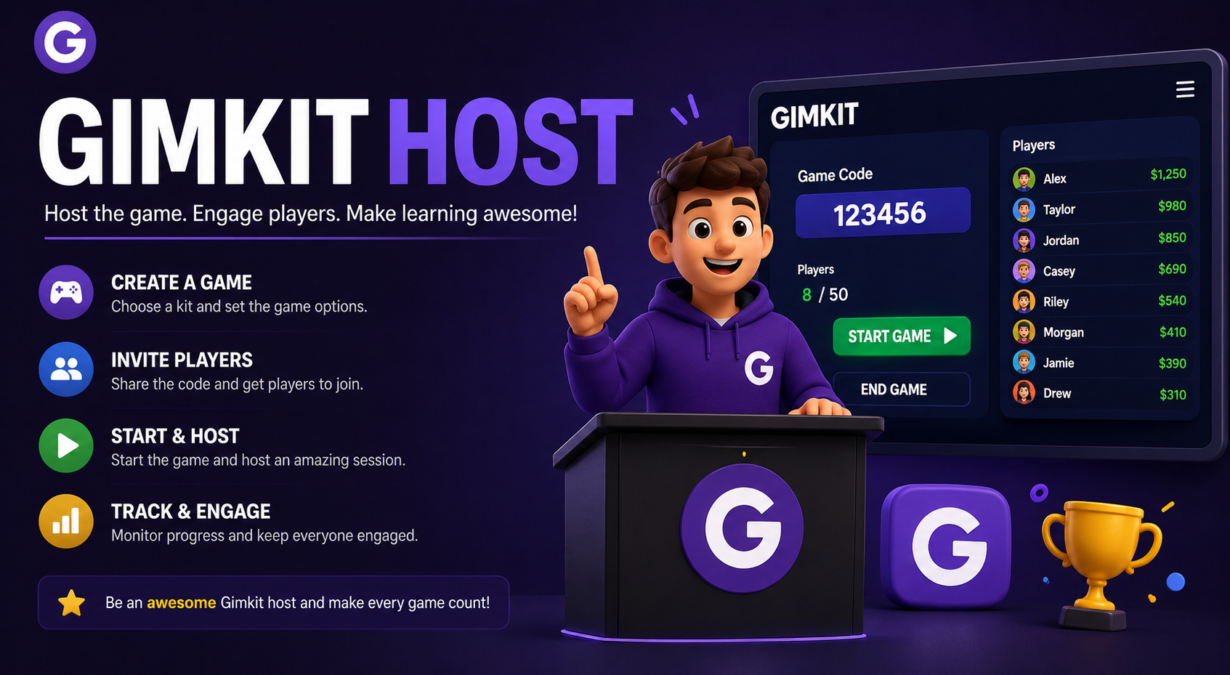
The basic hosting process is straightforward. Gimkit’s official hosting guide says that a host needs to select a kit, select a game mode, set up game options, share the game code or join link, and then start the game. These steps are simple enough for beginners, which is one reason teachers can start using Gimkit without needing a long training process. However, each step still deserves attention if the host wants the session to run smoothly.
The first practical step is choosing the right kit. The host should quickly preview the questions before launching the game. This helps catch spelling mistakes, confusing wording, duplicate questions, or answers that may not match the lesson. A few minutes of checking can prevent confusion during the game. Students lose trust in the activity when a correct answer is marked wrong or a question is written poorly.
The next step is sharing the game code or join link. Students usually join through the Gimkit join page, where they enter the code given by the host. Gimkit states that students can play live games and assignments without needing to log into an account, although accounts are needed for features like classes, XP, and cosmetics. This is helpful for teachers because it reduces setup problems, especially when students are using shared devices or joining quickly during class.
Choosing the Best Game Mode as a Gimkit Host
One of the biggest decisions a Gimkit host makes is choosing the game mode. The mode controls the style of play, the pace, and often the mood of the classroom. A fast-paced mode may be perfect when students need energy, while a more strategic mode may work better when the goal is thoughtful review. The host should avoid choosing a mode only because it is popular. Popular does not always mean suitable for that day’s lesson.
For a short class period, a simple mode can be better because students spend less time learning the rules and more time answering questions. For longer sessions, more complex modes can work well because students have time to understand the strategy. If students are new to Gimkit, the host should start with an easier mode before moving into more advanced or movement-based options. This keeps frustration low and helps students focus on learning.
A strong Gimkit host also considers classroom management. Some modes may create more excitement, movement, or competition than others. That can be positive, but only if the class can handle it. If a group is already energetic, the host may choose a mode that keeps students focused on questions rather than chaotic interaction. If the class feels tired, a more active mode can bring life back into the room.
Tips for Hosting a Smooth Gimkit Session
The first tip for any Gimkit host is to prepare before class begins. Open the kit, check the questions, decide the mode, and know the settings before students are ready to play. This prevents wasted time and keeps the class from becoming restless. When students are waiting while the teacher experiments with options, attention can drop quickly. Preparation helps the host look confident and keeps the activity professional.
The second tip is to explain the purpose of the game before launching it. Students should know whether the game is for review, practice, test preparation, or skill building. A simple sentence like “Today we are using this Gimkit to review the vocabulary from Chapter 4” gives the game academic direction. Without that direction, students may treat the session only as a competition and ignore what they are supposed to learn.
The third tip is to keep an eye on the live results and student behavior. Gimkit provides reports for live games and assignments, which can help teachers review performance after the activity. During the session, the host should also watch for students using inappropriate names, guessing randomly, or focusing only on game mechanics. Hosting is active, not passive. The teacher should move around, encourage students, and use the game data to guide follow-up instruction.
Common Mistakes New Gimkit Hosts Make
One common mistake is using a kit without checking it first. Many teachers are busy, so it is tempting to pick a public kit and start immediately. The problem is that public or reused content may not match the exact lesson, grade level, or vocabulary style of your class. A Gimkit host should always review the kit before using it. Even a good kit may need small edits to fit the classroom perfectly.
Another mistake is choosing a game mode that is too complicated for the available time. Some modes require students to understand rules, movement, strategy, or objectives beyond answering questions. That can be fun, but it can also waste time if students are confused. A host should match the complexity of the mode to the length of the session. For a ten-minute review, simple is usually better. For a full review day, a deeper mode may be more effective.
A third mistake is ignoring the learning data after the game ends. Gimkit can be exciting, but the real value comes from what the teacher learns about student understanding. If many students miss the same question, that topic needs reteaching. If one student struggles across the whole kit, they may need extra support. A good Gimkit host uses the game as a learning tool, not just a reward activity.
Using Gimkit Host Features for Better Classroom Control
Classroom control matters because live games can become noisy and competitive. A Gimkit host should set expectations before students join. For example, the host can tell students to use appropriate names, stay on task, and treat the game as a learning activity. Gimkit’s classes feature can help with name control because classes can show students under their class names on the leaderboard. This can reduce the problem of silly or inappropriate nicknames in live games.
The host should also decide whether students will play individually or in teams, depending on the mode and objective. Individual play is useful when the teacher wants to measure each student’s understanding. Team play can be better when the goal is collaboration, discussion, or peer support. Neither option is always better. The right choice depends on the class, the topic, and the reason for playing.
Another useful control strategy is setting a clear time limit or stopping point. Students often want to keep playing, but the host has to protect lesson time. Before starting, the host can say, “We will play for twelve minutes, then review the hardest questions together.” This makes the session feel organized and helps students understand that Gimkit is part of the lesson, not separate from it.
Gimkit Host for Homework and Assignments
Although many people think of Gimkit as a live classroom game, it can also be used outside class. Gimkit’s official site notes that the platform can be assigned as homework and that assignments are automatically graded. This means a teacher does not always have to host a live session in real time. Instead, the host can create an assignment and let students complete it independently.
Assignments can be useful for distance learning, independent study, extra practice, or homework review. Gimkit’s help center explains that assignments allow students to play from anywhere, and the assignment feature is available to Gimkit Pro members. For teachers who want students to practice without using class time, assignments can be a practical option. They also help students who need more repetition than a live game allows.
However, assignments should still be planned carefully. A Gimkit host should not assign a game just because it is easy to share. The assignment should match a learning target, include clear instructions, and have a reasonable deadline. If the goal is test review, the assignment should include questions similar to the test format. If the goal is vocabulary practice, the questions should require students to understand meaning, not just memorize words.
How a Gimkit Host Can Increase Student Engagement
Engagement starts with choosing content students actually need to practice. A fun game mode cannot fix weak content. If the questions are too easy, students may get bored. If they are too hard, students may start guessing. A good Gimkit host creates a balanced kit with a mix of recall, understanding, and application questions. This keeps students challenged without making the game feel impossible.
The host can also increase engagement by building short discussion moments into the session. For example, after the game ends, the teacher can show the most missed questions and ask students to explain the correct answers. This turns the game from a quick competition into a learning conversation. Students get to see where they struggled and understand why the correct answer makes sense.
Another powerful engagement strategy is student involvement. Gimkit includes KitCollab, a feature that lets others submit questions to a kit, and approved questions can be added before playing live or turning the kit into an assignment. When students help create questions, they think more deeply about the content. They are not only answering questions; they are learning how to write good ones.
Why the Gimkit Host Role Matters More Than the Game Itself
Technology does not automatically create learning. A game can be exciting and still fail academically if it is not used with purpose. That is why the Gimkit host role is so important. The host connects the game to the lesson, manages the flow, interprets the results, and helps students understand what they are practicing. Without a thoughtful host, Gimkit can become just another classroom distraction.
The best Gimkit hosts understand that fun and learning should work together. Students may remember the excitement of a close game, but they should also remember the content. The host can make that happen by choosing strong questions, reviewing mistakes, encouraging effort, and connecting the activity back to the lesson. In this way, Gimkit becomes more than a game; it becomes a structured review system.
A skilled host also knows when not to use Gimkit. Not every lesson needs a game. Some topics require direct teaching, quiet reading, writing, discussion, or hands-on practice. Gimkit works best when it supports a clear purpose. The expert host uses it at the right time, with the right group, and for the right reason.
Final Thoughts on Being a Better Gimkit Host
Being a successful gimkit host is not about being the most tech-savvy teacher in the room. It is about making smart teaching decisions. You need to choose the right kit, select a suitable mode, adjust the settings, guide students, and use the results meaningfully. When all of those parts come together, Gimkit can make review sessions more lively, focused, and memorable.
For beginners, the best approach is to start simple. Choose a short kit, use an easy mode, explain expectations clearly, and play for a limited time. After the game, review the questions students missed most. This simple routine can already make a big difference. As you become more comfortable, you can experiment with different modes, assignments, classes, and collaborative question-building.
In the end, Gimkit is only as effective as the way it is hosted. A strong host turns game energy into learning energy. A weak host may get excitement but little understanding. If you want students to enjoy review while actually improving their knowledge, focus on becoming a better Gimkit host. The platform gives you the tools, but your planning, timing, and teaching choices make the experience truly valuable.